Backlogged Game Tracker: Organize play and consult interactive maps
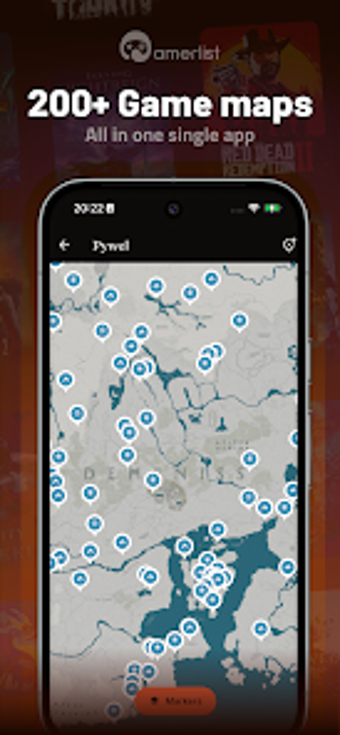
Backlogged - Game Tracker, from brightfox, helps players tame sprawling game collections and session notes across devices. The app centralizes library tracking, offers 700+ interactive maps for more than 200 titles, imports Steam libraries automatically, and stores a private gaming journal with photo attachments and session logs. Custom lists, status categories like Want to Play and Completed, and detailed game pages assist organization and discovery. It targets completionists, collectors, and regular players who need a companion to maintain steady play habits.
Keeps short play sessions and long campaigns connected
Daily use focuses on recording and continuity. The tool lets players capture short notes and session timestamps so interrupted play can resume with context; the private journal accepts photos and resume remarks. For someone juggling multiple titles, that persistent record helps recall where a playthrough left off and which tasks still matter on the next session.
Imports and cross-platform tracking cut manual entry
Automated imports reduce repetitive setup. The app connects to Steam to pull library entries and playtime, and it supports tracking across PC and major consoles, allowing users to categorize titles by current status. That setup lowers the barrier to centralizing a scattered collection, especially for players with libraries on multiple storefronts and systems.
Offers list customization and focused organization for collectors
Personal organization fits varied play styles. Custom lists let users group games by mood, challenge, or genre, while clearly labeled status categories assist sorting and prioritizing. The detailed game pages supply release context and community notes so collectors and completionists can plan which title to tackle next, or which backlog item to promote to active play.
Requires an account and provides account-gated extras for synced progress
Account sign-in centralizes data and optional sync features. The app requires a sign-in to synchronize library records and journal entries across devices. An account-gated Pro tier removes ads and unlocks cloud-synced map progress. Steam integration shares playtime data during imports, so users who enable linking see their external play history reflected inside the tool.
To sum up, a practical companion for organized players who log sessions
To sum up, the app is a practical option for completionists and collectors who prefer measured, recorded play instead of ad hoc sessions; it rewards a short post-play habit to preserve momentum and memories. Players who avoid any account setup may find it less appealing. A simple routine of noting a next objective after each session greatly increases the app's long-term usefulness.